
New Employee Welcome Email and Letter Examples
A welcome message should help a new hire feel expected and prepared for the first day. These examples show how to share the start date, role, team contacts and first-day instructions clearly.
Before You Send a New Employee Welcome Email
A new employee welcome email is part of onboarding, not just a friendly greeting. Before sending it, confirm the start date, job title, reporting manager, work schedule, location or remote link, required documents, equipment, dress code, access instructions and the main contact for questions.
Keep the tone warm but practical. A new hire usually wants to know three things right away: where to go, what to do first and who will help them. Avoid overwhelming them with every company policy in the welcome message. Save detailed HR forms, handbooks, benefits documents or compliance steps for the appropriate onboarding process.
Be careful not to make promises that differ from the signed offer, contract or company policy. Do not suggest that the role, schedule, probation process, benefits or working arrangement is different from what was agreed. The welcome email should support onboarding, not change employment terms.
New Employee Welcome Email From a Manager
A warm and practical new employee welcome email from a manager with role details, first-day guidance and reassurance from the team.
Subject: Welcome to [Company Name], [Employee Name]
Hello [Employee Name],
Welcome to [Company Name]. We are very pleased that you will be joining us as [Job Title] in [Department / Team Name].
Your start date is [Start Date], and we look forward to meeting you at [Start Time]. On your first day, please [come to reception / join the video call / check in with HR / meet me at location], and we will guide you through the first steps.
During your first week, we will help you get to know the team, understand your role, become familiar with the tools you will use and review the priorities for the coming weeks. You will also meet [Team Member / HR Contact / Mentor Name], who can answer questions as you settle in.
If anything is unclear before your start date, please contact me. We want your first days with us to feel organized and welcoming.
We are excited to have you on the team and look forward to working with you.
Best regards,
[Your Name]
[Your Position] [Company Name]

Reviewed by Michael T., Business Communications Consultant
This email is effective because it is both welcoming and useful. It gives the new hire the start details and a clear sense of support without overwhelming them.
Formal New Employee Welcome Letter From HR
A structured new employee welcome letter from HR confirming onboarding details, documents and first-day instructions.
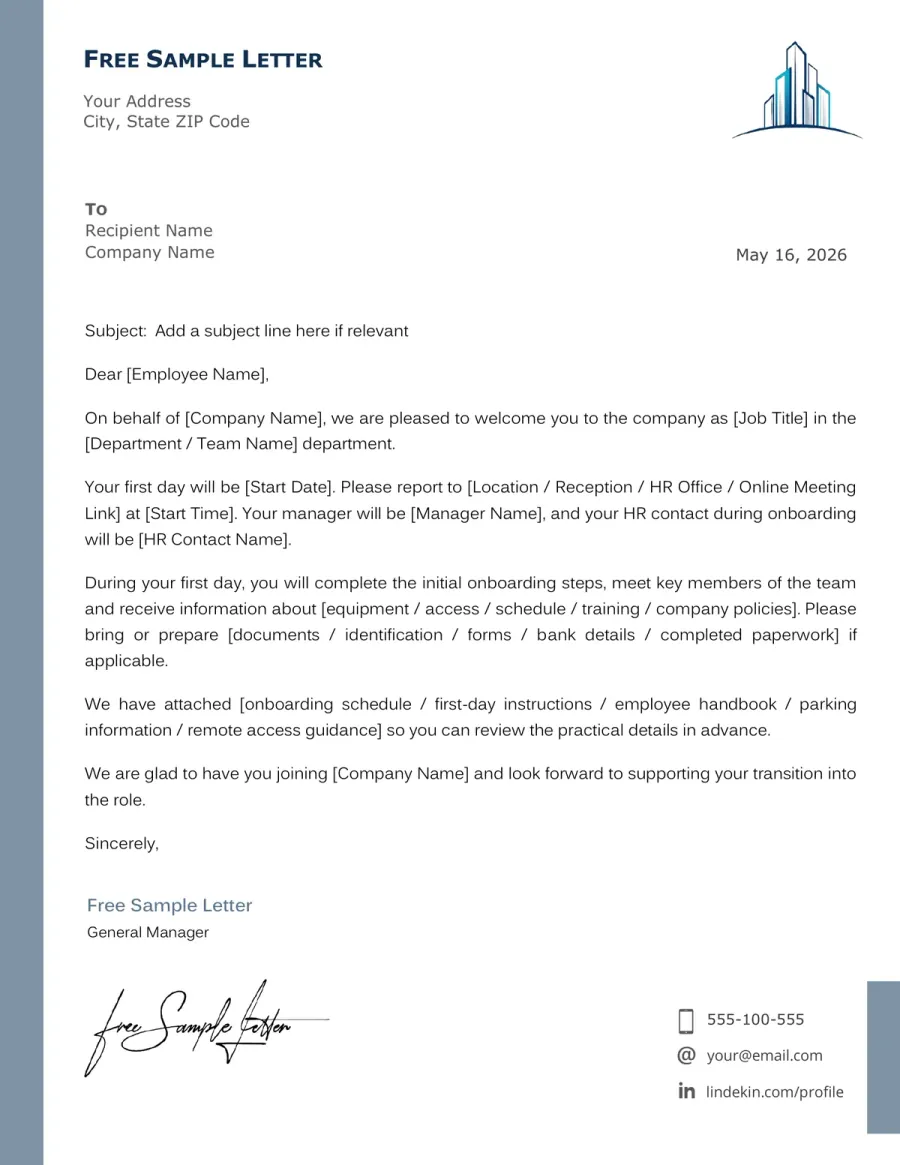
Dear [Employee Name],
On behalf of [Company Name], we are pleased to welcome you as [Job Title] in [Department / Team Name].
Your first day will be [Start Date]. Please report to [Location / Reception / HR Office / Online Meeting Link] at [Start Time]. Your manager will be [Manager Name], and your HR contact during onboarding will be [HR Contact Name].
During your first day, you will complete the initial onboarding steps, meet key team members and receive information about [equipment / access / schedule / training / company policies]. Please bring or prepare [documents / identification / forms / bank details / completed paperwork] if applicable.
We have attached [onboarding schedule / first-day instructions / employee handbook / parking information / remote access guidance] so you can review the practical details in advance.
We are glad to have you join [Company Name] and look forward to supporting your transition into the role.
Sincerely,
[Your Name]
[Your Position] [Company Name] [Contact Details]
Reviewed by Michael T., Business Communications Consultant
This HR version is effective because it separates the welcome from the practical onboarding information the employee needs before day one.
Welcome Email to a New Team Member
A friendly welcome email to a new team member sent by colleagues, a department or a small team.
Subject: Welcome to the team, [Employee Name]
Hello [Employee Name],
Welcome to [Team / Department Name]. We look forward to working with you and getting to know you as you settle into your new role as [Job Title].
Your first few days will include introductions, a team overview and time to learn how we work together. Please do not feel that you need to know everything right away. We will help you become familiar with the tools, routines and contacts you need.
You will be working closely with [Team Member Name / Mentor Name] on [Project / Responsibility / Area], and the rest of us will be happy to answer questions as they come up.
We are glad you are joining us and hope your first week feels positive, clear and well supported.
Welcome again,
[Team / Department Name]
Reviewed by Michael T., Business Communications Consultant
This team message feels human because it lowers first-week pressure and shows the new employee that colleagues are ready to help.
Remote Employee Welcome Email Before the First Day
A practical remote employee welcome email for new hires who need login details, video meeting information and virtual onboarding steps.
Subject: Welcome to [Company Name] - remote onboarding details
Hello [Employee Name],
Welcome to [Company Name]. We are excited to have you join us as [Job Title] on [Start Date]. Since your onboarding will begin remotely, I want to share the first practical details in advance.
Your first meeting will take place on [Date] at [Time and Time Zone] using [Video Platform]. You can join through this link: [Meeting Link]. During that call, we will review your onboarding schedule, introduce you to the team and confirm access to the tools you will need.
Before your first day, please make sure you have received or completed [equipment delivery / login setup / HR documents / security steps / communication platform access]. If anything is missing, contact [Contact Name] at [Email Address].
We know remote onboarding can feel different from starting in an office, so we will make sure you have clear contacts and regular check-ins during your first week.
We look forward to welcoming you on [Start Date].
Best regards,
[Your Name]
[Company Name]
Reviewed by Michael T., Business Communications Consultant
This remote welcome email works well because it anticipates the practical questions a new hire may have before a virtual first day.
Preview of the Free New Employee Welcome Email Template
Use the preview to check the structure before downloading the editable version. The template makes the start date, role, team contacts, onboarding details and first-day instructions easy to review and adapt.
How to Write a New Employee Welcome Email
A strong new employee welcome email should be warm, clear and useful before the first day. Begin with a welcome, then state the role, start date, schedule, contact person and practical onboarding steps.
➡️ More practical help in our guide how to write a professional letter or email with a clear next step
Confirm the role and start date
Start with the employee’s name, job title, department and first day. If the person has not yet been selected and you are still scheduling interviews, use an interview invitation email from an employer instead.
See a clear opening
Welcome to [Company Name]. We are pleased that you will be joining us as [Job Title] on [Start Date].
Give the first-day instructions
Tell the employee where to go, when to arrive, which link to use or who to meet first. Even a warm message should include practical details.
See practical wording
Please arrive at [Location] at [Start Time] and ask for [Contact Name] at reception.
Introduce the manager, HR contact or mentor
A new hire should know who will support them during their first days. Mention who is responsible for onboarding, technical access or introducing them to the team.
See contact wording
Your manager will be [Manager Name], and [HR Contact Name] will help you with onboarding documents.
Keep onboarding details organized
Include documents, equipment, schedule, parking, remote access or dress code only when relevant. If the welcome will be spoken at an event or meeting, use a welcome speech for volunteers and new members instead of an email format.
See Why this helps
Attach the onboarding schedule instead of placing every policy detail inside the welcome email.
End with reassurance and availability
Close by making it clear that questions are welcome. The best welcome messages reduce first-day uncertainty without sounding scripted.
See a warm closing
If anything is unclear before your start date, please contact me. We look forward to welcoming you.
What to Include in a New Employee Welcome Email
- Employee Name
- Job Title
- Department
- Start Date
- Start Time
- Work Location or Meeting Link
- Manager Name
- HR Contact
- Onboarding Schedule
- Documents to Bring
- Equipment or Access Details
- First-Week Expectations
Do & Don’t - New Employee Welcome Email
A welcome email should make the new employee feel expected and prepared. The strongest messages combine warmth with the practical details needed before the first day.
What Weakens the Welcome
Red Flags- Send a warm welcome with no start time or first-day details
- Overload the email with every HR policy and handbook rule
- Change employment terms from the offer or contract
- Use generic excitement with no role or team context
- Forget the manager, HR contact or onboarding contact
- Make remote employees search for links, logins or schedule details
What Makes the Message More Useful
Trust Signals- Welcome the employee by name
- Confirm the role, department and start date
- Give first-day instructions clearly
- Name the manager, mentor or HR contact
- Attach onboarding details when needed
- End with a clear invitation to ask questions
FAQ - New Employee Welcome Email
What should a new employee welcome email include? Toggle answer
Include the employee’s name, role, start date, start time, work location or meeting link, manager or HR contact, onboarding schedule and any instructions about documents or equipment needed before the first day.
Should a welcome message be formal or friendly? Toggle answer
It should be both professional and warm. HR letters may be more structured, while manager or team emails can be more personal. In every case, the message should provide practical information, not just congratulations.
When should I send a new employee welcome email? Toggle answer
Send it after the offer is accepted and before the first day, once the start details are confirmed. This gives the employee time to prepare, ask questions and understand what to expect when they arrive or log in.
Can I send a welcome email for a remote employee? Toggle answer
Yes. For remote onboarding, include the meeting link, platform, time zone, equipment status, login setup, HR forms and a contact person. Remote employees especially need clear first-day instructions.
Should I attach onboarding documents? Toggle answer
Attach documents when they are useful and approved by HR. A welcome email can mention them, but detailed policies, benefits, legal forms and handbooks are usually better handled through the normal onboarding process.
What should I avoid in a new employee welcome letter? Toggle answer
Avoid vague excitement, missing start details, policy overload or promises that differ from the signed offer or contract. Do not include private employee information or internal details the new hire does not need yet.
TL;DR - Make the New Hire Feel Expected and Prepared
A strong new employee welcome email does more than say “welcome.” It confirms the role, start date, first-day instructions, manager or HR contact and the next onboarding step.
Before sending it, check that the details match the accepted offer, schedule and company process. Keep the tone warm, but make the practical information easy to find. The new hire should finish reading with less uncertainty, not more.