
Administrative & Office Resume Template for Assistant, Clerical and Front Desk Roles
This administrative and office resume template offers a clear, organized way to highlight office support, clerical work, scheduling, communication, document handling, and front desk experience. It is designed for job seekers who need a professional resume or CV layout that is easy to scan and simple to customize.
Table of Contents
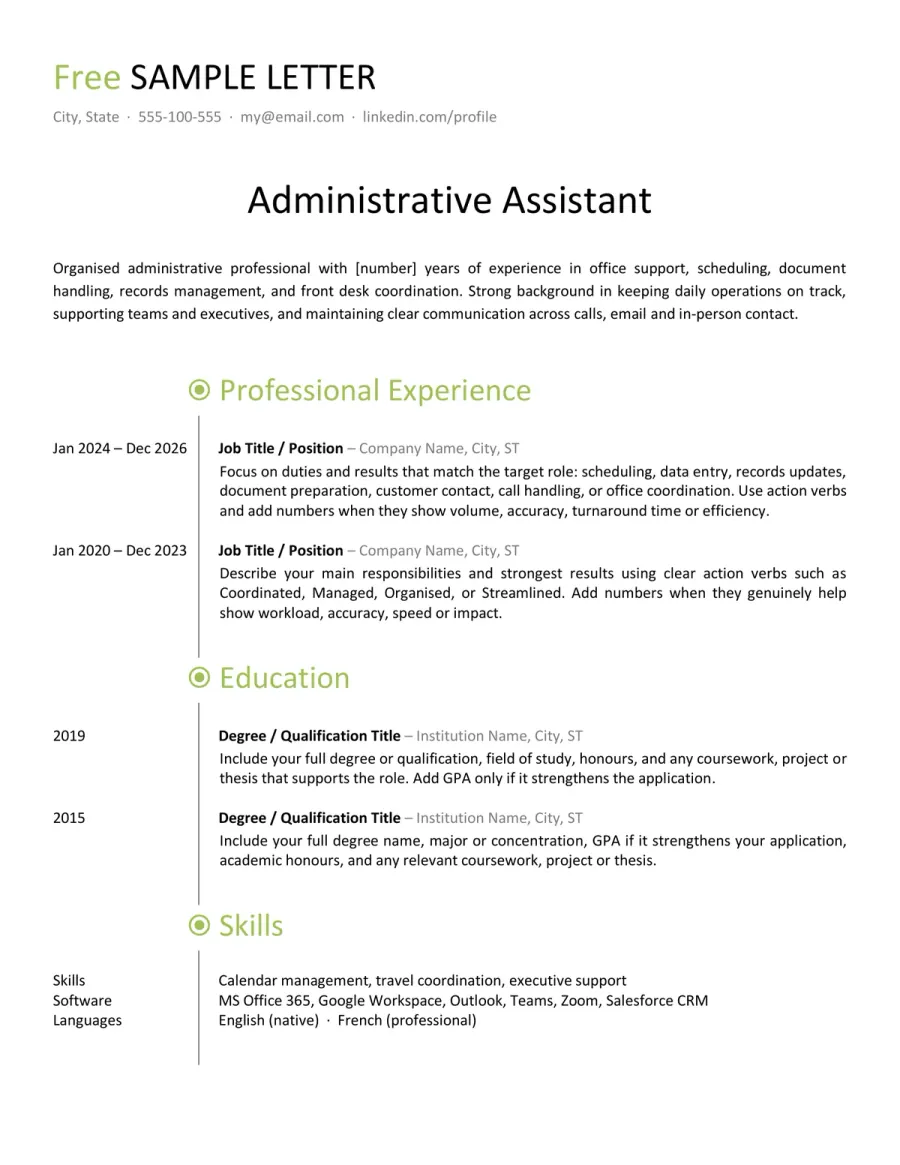
Preview of the Free Administrative & Office CV Example You Can Download
Use this editable administrative resume template if you want a layout that stays clean, readable, and easy to tailor for office-based roles. This resume and CV format is well-suited for administrative assistant, office support, clerical, reception, and front desk positions. Review the structure first, then download the Word version and adapt each section to your own experience.

Reviewed by Daniel K., Resume Consultant
This layout works because it remains professional without feeling rigid. It suits office administration well, but it also adapts naturally to receptionist, support, and clerical roles where clarity matters more than decoration.
Who This Administrative Resume Template Works Best For
This sample is designed for a range of office-facing roles, not just one job title. Whether you call it a resume or a CV, it is a strong fit when employers value reliability, communication, organization, and practical support in daily operations.
- Administrative assistants who need a clear resume for scheduling, correspondence, document handling, filing, and office coordination.
- Office assistants and office support candidates applying for roles built around data entry, team support, meeting logistics, and day-to-day organization.
- Clerical applicants who want a more polished CV for records, forms, back-office processing, and routine administrative follow-up.
- Receptionists who need to show visitor handling, phone coverage, appointment scheduling, and clear front desk communication.
- Front office candidates applying to roles that combine reception, inbox support, scheduling, document preparation, and routine administrative follow-up.
- Candidates applying to smaller companies where one job may mix reception, scheduling, document preparation, and general office support.
How to Adapt This Administrative Resume Template
Administrative hiring may seem straightforward, but recruiters still scan for relevance quickly. The strongest office resumes avoid flashy language. They make your target role, support value, and practical office skills clear from the start.
Match the exact office role in your headline and summary
Administrative assistant, office assistant, receptionist, clerical employee, and front office receptionist roles often overlap, but recruiters respond better when a resume feels targeted. Start by matching your headline and summary to the language used in the job posting.
See an example
If the job title says “Front Office Receptionist,” bring visitor reception, phone handling, appointment scheduling, and first-contact communication closer to the top.
Highlight the tasks that actually carry weight
Do not list every minor office duty you have ever handled. Focus on responsibilities that demonstrate reliability and value, such as calendar support, document preparation, data entry, records updates, calls, inbox management, and coordination.
See What to prioritize
Calendar management, visitor reception, filing systems, meeting support, email follow-up, document formatting, and records management are all stronger than vague phrases like “helped with office tasks.”
Name the software tools when they matter
Administrative resumes are stronger when they specify the software you use. If you work with Word, Excel, Outlook, Google Docs, Sheets, Calendar, or other scheduling or office platforms, mention the tools that directly support your application.
See Better phrasing
“Prepared schedules and tracked records in Excel and Outlook” is much clearer than “good computer skills.”
Adjust the balance between front office and back office work
Some roles focus on reception, while others are more clerical or internal. Your resume should reflect that balance. Front office jobs should highlight calls, visitors, appointments, and first-contact professionalism. Back-office roles should emphasize records, coordination, document accuracy, and support work.
See Quick rule
For a reception role, move front desk duties higher. For an office support role, move records, spreadsheets, filing, and document workflows higher.
Use proof of reliability, not inflated wording
You do not need dramatic achievements to make this type of CV effective. Small, concrete details like accurate schedules, organized records, fewer missed calls, consistent document handling, or smoother front desk routines are what matter.
See Good direction
Instead of “motivated team player,” say “maintained appointment records, handled visitor reception, updated files, and supported daily office coordination.”
Keywords Recruiters Often Expect on This Type of Resume
- Administrative support
- Office coordination
- Front desk reception
- Appointment scheduling
- Calendar management
- Data entry
- Records management
- Document preparation
- Inbox and correspondence handling
- Phone handling and call routing
- Visitor reception
- Meeting support
- Microsoft Office
- Word, Excel, Outlook
- Google Workspace
- Filing and document organization
- Office procedures
- Customer service
Do & Don’t - What Makes an Administrative Resume Easier to Trust
For office roles, recruiters often decide quickly if a resume feels dependable. The strongest resumes are clear, practical, and easy to connect to the daily demands of the job.
What Weakens This Type of Resume Fast
Red Flags- Using a vague summary that never says what office role you are targeting
- Listing broad soft skills without showing the work behind them
- Hiding all software under labels like “computer literate”
- Mixing clerical, reception, and support tasks with no clear order
- Listing many duties without showing precision or reliability
What Makes the Resume Feel Stronger Immediately
Trust Signals- Name the exact office functions you supported
- Show clear alignment with assistant, clerical, receptionist, or front office work
- Mention the software tools that genuinely matter for the role
- Highlight scheduling, records, calls, visitors, and document handling when relevant
- Keep the layout simple, readable, and easy to scan in less than a minute
FAQ - Administrative & Office CV Template
Can I use this resume template for both administrative assistant and receptionist jobs? Toggle answer
Yes. That is one of its main strengths. It covers the shared ground between office support, clerical work, and reception. You just need to shift the emphasis depending on whether the job is more front-office or back-office.
Is this template suitable for a front office receptionist application? Toggle answer
Yes. It works well for front-office receptionist roles if you move visitor reception, phone handling, appointment scheduling, and first-contact communication closer to the top of the resume.
What should I highlight first for an office support or clerical role? Toggle answer
Start with the tasks that show structure and reliability: data entry, records updates, document preparation, filing systems, scheduling support, and the office tools you actually use.
Should I include Microsoft Office and Google Workspace on an administrative resume? Toggle answer
Yes, if you really use them. Office-based roles often expect practical comfort with Word, Excel, Outlook, Docs, Sheets, Calendar, and similar tools. Naming the right tools is usually better than writing a vague “computer skills” line.
Can I edit this resume template in Microsoft Word, LibreOffice, or Google Docs? Toggle answer
Yes, in most cases. The template is designed to stay easy to edit in Word first, but it should also remain usable in LibreOffice and Google Docs. Minor spacing or font differences can still appear depending on the software.
Is this resume template too broad if I apply to one specific office job? Toggle answer
No, as long as you tailor it properly. The structure is broad on purpose, but the final version you send should still reflect the exact title, duties, tools, and priorities of the job you want.
What to Do Next With This Resume Template
A strong administrative or office resume or CV should feel dependable before it tries to impress. Keep the layout easy to scan, make your target role clear, and highlight the office tasks employers actually need help with. For these roles, clarity, organization, and relevance matter far more than elaborate design or exaggerated claims.